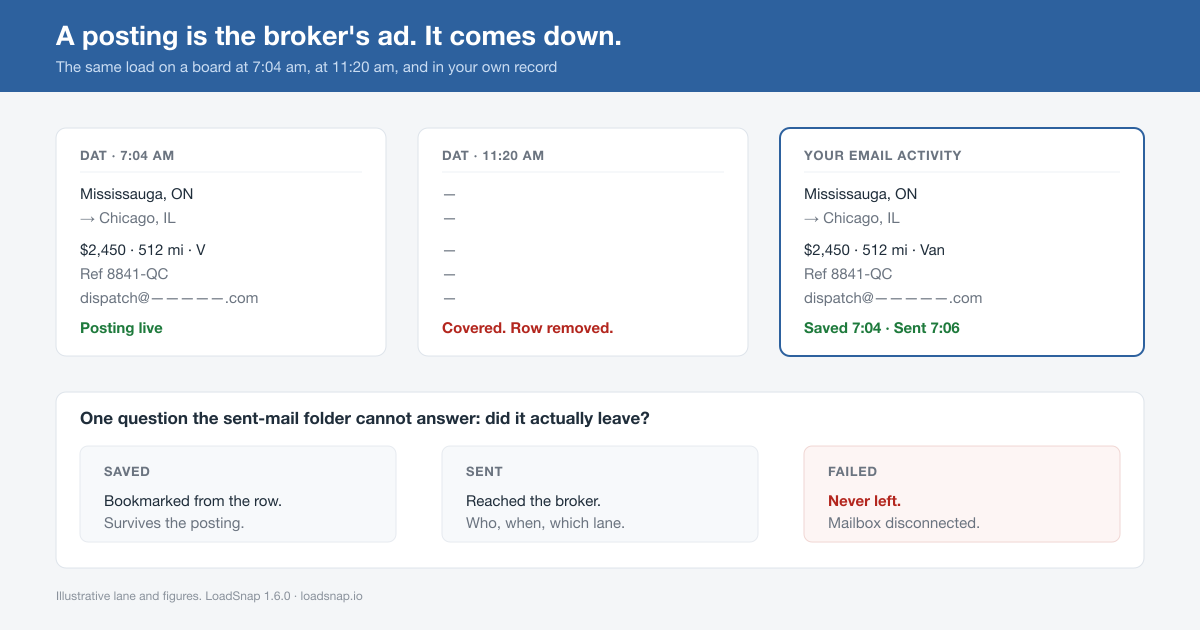
You saw it at 7:04. Mississauga to Chicago, dry van, $2,450, 512 miles. You clicked, the email went, you moved down the grid.
At 11:20 your driver asks what you quoted on that lane. You go back to the board. The row is gone. The broker covered it, and the posting came down with it — the rate, the reference number, the contact address, the deadhead, all of it.
You still have the sent email. It tells you who you wrote to and roughly when. It does not tell you what the posting said.
A posting is an ad, and ads come down
This is worth saying plainly because most dispatchers work around it without ever naming it: a load board posting is not your record. It is the broker’s advertisement for one load, and it exists to be deleted.
When the load covers, the row is pulled. That is correct behaviour for the board. It is a problem for you, because the board is also the only place that ever held the full detail of what you acted on. Your actual history of the morning ends up scattered across three places that each hold a third of it — the sent-mail folder has the address and the timestamp, a notepad has the lane, and your memory has the rate.
Then there is the part nobody has a copy of at all: which of this morning’s emails actually left.
LoadSnap sends through your own mailbox, using a token your provider issues. Tokens expire. They get revoked when you change your password. They get pulled when an IT admin rotates workspace access. When that happens the send fails at the provider — after the click, after the button moved. You believe you emailed that broker. The broker never heard from you. You find out when the lane covers and you never got a reply, and you file it under “market’s soft this week.”
What LoadSnap 1.6.0 changes
Version 1.6.0 records what you did about a load at the moment you did it, and puts the result somewhere you can read it back.
On the board, every row now carries four actions, on DAT, Truckstop and both LoadLink builds:
- Save bookmarks the load. It writes the same capture a send writes, with a
savedstatus — so bookmarks sit beside the emails in one list instead of in a second store you’d never think to check. Save the same load twice and you get one record, not two. - Call appears only when what was captured is actually a phone number. On LoadLink it reads the lead panel by its labels, not by the shape of the digits, so a fax number does not get a Call button next to it.
- Map opens the lane in Google Maps built from the same capture that fed the email — so what opens agrees with what got stored.
- Copy puts the number on your clipboard without retyping it.
In app.loadsnap.io, Email Activity now shows those records as a table: Saved, Sent, Failed and All, each tab carrying its own count, filterable by board. Failed is the one to look at first. no_refresh_token reads as Mailbox disconnected — a send that never left, with the lane and the broker still attached so you know exactly what to redo.
One deliberate detail in that table: a dash means the board never published that field, not that the capture failed. DAT doesn’t post a phone on every row. LoadLink doesn’t post an RPM column at all. A dash is the board being quiet, and it should not look like a bug.
That normalising is doing more work than it appears to. The three boards use three different names for the same fact — DAT publishes rate-per-mile as rpmDh, Truckstop as rate-per-mile, and LoadLink puts the available date under a column simply headed “Date”. LoadSnap maps all of them onto one shape, which is why a Truckstop lane and a DAT lane can sit in the same table and be compared. The raw scrape is kept underneath, so when a board changes its markup, the record still holds the evidence.
Seven things to check today
- Open app.loadsnap.io → Email Activity and click Failed. If the count is above zero, read the reason before you do anything else.
- If any row says Mailbox disconnected, reconnect your mailbox, then re-send those loads. Those brokers never heard from you.
- Click Saved. If it’s empty, you haven’t used the Save button yet — that’s the habit this release is asking for.
- Filter by board. If one board’s rows are thin on contact detail, that’s the board, not the tool.
- Check the Sent tab before you email a broker you think you’ve already contacted this week. That is the question the tab exists to answer.
- Update the extension. If you keep a board tab open all day, Chrome leaves the old code running in it — 1.6.0 now puts a notice at the top right telling you to reload, instead of letting you find out on the click that mattered.
- Delete the rows you don’t want. Each one has a delete on it, with a confirm.
Before and after, on the same load
Before — what you had at 11:20:
Sent mail: "Re: Mississauga → Chicago" to dispatch@…  (7:06 AM)
Notepad:   Miss → CHI, van, that Ontario broker
Memory:    twenty-four something? Twenty-four fifty?
Posting:   deleted
After — one row in Email Activity:
Sep 6, 7:04 AM   Mississauga, ON → Chicago, IL
                 $2,450 · 512 mi · Van · Ref 8841-QC
                 Contact: dispatch@…   Board: DAT
                 Saved 7:04 · Sent 7:06   Status: Sent
And when you follow up two days later, you are writing from the record instead of from memory:
Subject: Mississauga, ON → Chicago, IL — following up (Ref 8841-QC)

Hi — I emailed Tuesday morning about your Mississauga to Chicago
van load, ref 8841-QC, posted at $2,450 for 512 miles.

If that one covered, I run this lane weekly and have equipment in
the GTA most Monday mornings. Happy to be your first call next time.

MC ###### · dispatch@…  · (###) ###-####
A broker gets a lot of “just following up.” Almost none of them arrive with the reference number and the posted rate still attached, two days after the posting came down. That is the whole difference, and it costs you one click at 7:04 in the morning.
Do this today
Open Email Activity and check the Failed tab. Everything else on this page can wait a week. A send that never left is the only item here that is actively costing you loads right now.
LoadSnap is a Chrome extension that sends a personalised broker email in one click from LoadLink, DAT and Truckstop — no retyping the lane, the equipment or your MC number. As of 1.6.0 it also keeps your copy of the load: saved, sent, or failed, with the board row as it looked when you acted on it. The posting still disappears. Your record of it doesn’t.
Related reading: Brokers Don’t Pick the Best Carrier. They Pick the First Credible One. and DAT vs Truckstop vs LoadLink: Which Load Board is Best in 2025?